
When you watch someone set up a mill or lathe, it’s kind of magical. Raw metal go in, and out pops a precisely shaped part with ribbons of chips trailing behind.
What’s not magical: it’s not luck. It’s math. Math you need to get one thing right: the surface speed.
What is Surface Speed?
When we’re just starting out, we pay attention to revolutions per minute (RPM). That’s what’s on the machine’s controller. But RPM alone isn’t enough. The critical number for making parts is called surface feet per minute, or SFM.
SFM measures how quick the tool’s cutting edge moves over the piece of material. Get this wrong and your tool will melt into a molten blob of metal. Or it’ll rub against the workpiece like a blunt knife; wasting time and ruining finish.
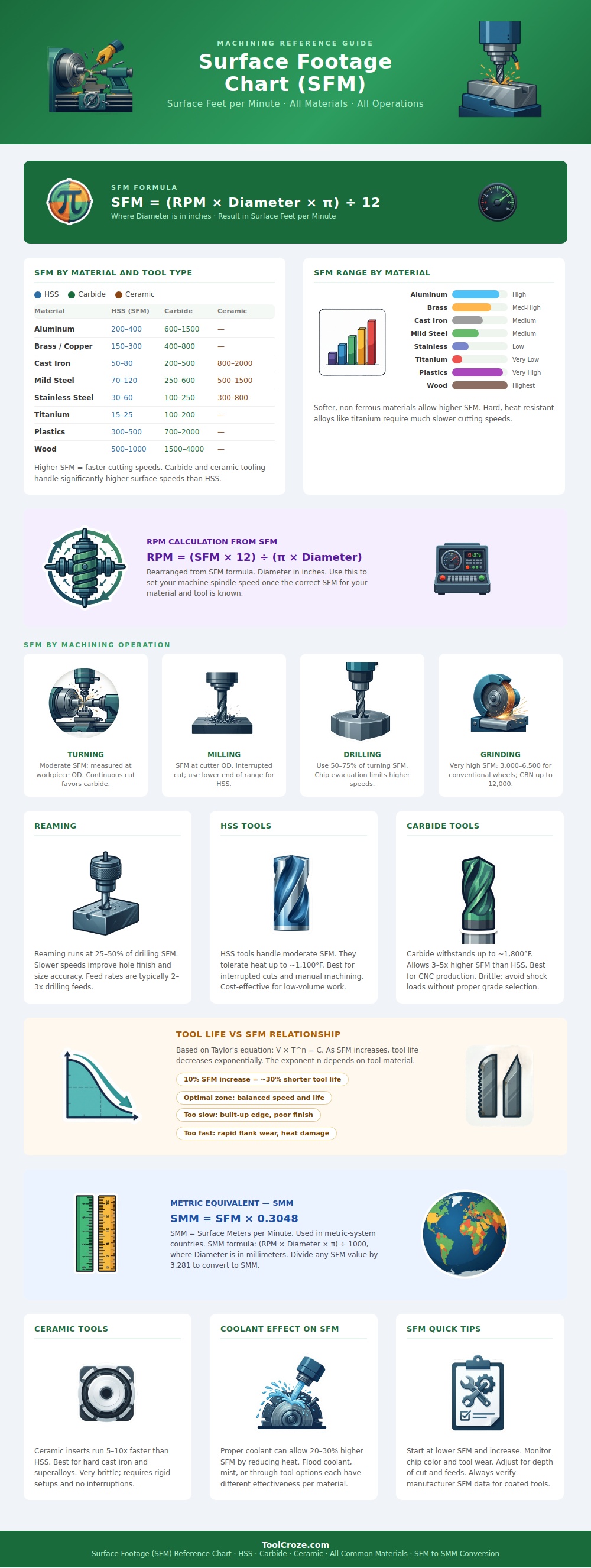
When you pick up a new tool or material, you don’t have to guess what speed works best. Use the list in the diagram above as a guide. As you’ll see, some materials is quite forgiving with really high speeds while others should be cut very slowly.
For example, something soft such as wood can withstand thousands of surface feet per minute without melting. Because it doesn’t generate the same intense heat as metal, it can handle much higher speeds than metal. On the other hand, a hard alloy like titanium must go slow. It doesn’t remove heat through chips; rather, it traps heat on the cutting edge. Even with today’s carbide inserts, running titanium to quickly means instant destruction of the insert due to built-up heat.
So why is there such a wide gap between titanium and aluminum? Why isn’t it just random? It is physics. Everything depends on choice of material for the tooling.
For example, high speed steel handles interrupted cuts well, such as when a milling tool goes in and out of the material repeatedly. This happen during milling. However, HSS cannot be run fast. Carbide tools are harder and retain their sharpness better at higher temps which allows you to drive speeds up way more higher. Ceramic inserts look like a piece of fine china but allow you to cut cast iron at speeds that would cause the steel to evaporate.
As you can see from the chart above, hierarchy is clear. You need a more rigid set-up of your machine with these tools. They also tend to be more brittle and cost more. This doesn’t mean you should of use ceramic for all problems. Use it if you need to produce something at high volume. Then speed becomes critical along with consistency. Don’t try using ceramic for delicate one-off prototyping. Any shock load can instantly break the insert.
Also think about what you’re doing. Drilling and turning aren’t the same. You need to get the chips out of that deep hole with the flutes. And if you go too fast, they’ll back up and drill another hole. That breaks your bit. The guideline says to use a fraction of the turning speed when drilling into the same type of material. Sounds counter intuitive. But it keeps you from tearing up your bit.
Reaming finishes the hole rather than removing much material, so it needs even less speed. Tearing the surface or getting a tapered hole is almost always the result of rushing a reamer. Take your time here. Patience pays.
In machining, there’s an old rule of thumb known as Taylor’s equation. According to this formula, for every ten-percent gain in cutting speed, your tool life decreases about thirty-percent. Ouch!
Many operators go for maximum throughput until their tools fail prematurely. They then back off to stretch out the life… But they do so slowly, such that they build up an edge on the cutter and ruin surface finish. The sweet spot lies between these two extremes. You desire just enough speed to shear cleanly, yet not so fast as to burn through inventory.
Coolant assists by washing away heat and permitting slightly greater speed, but coolant isn’t a magic wand. It won’t save you when you try to run titanium like aluminum.
In either case (and this is key for those working in a metric environment) surface meters per minute are actually just SFM times approximately 0.3. Same principle, different units.
Begin conservatively. Keep an eye on your chips. A blue chip indicates you’re running too fast. A dull gray chip suggests maybe you’re OK. A white powdery chip tells you you’ve got something wrong, either you’re too slow or perhaps you’re wearing them down. Tweak away. Ultimately it should be a steady rate of material removal, not too fast nor too slow.
And it’s about getting to that sweet spot where the machine hums along nicely and the parts seem just right.
